
Last updated on
Sep 27, 2026
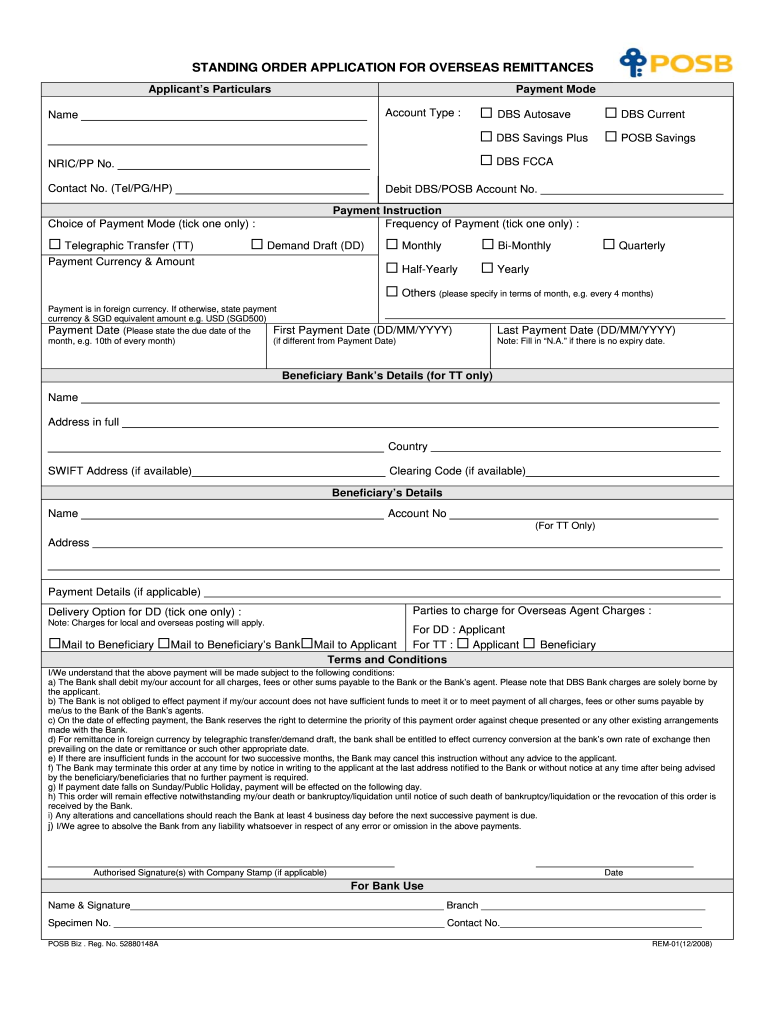
POSB REM-01 2008-2026 free printable template
We are not affiliated with any brand or entity on this form

Fill out
Complete the form online in a simple drag-and-drop editor.

eSign
Add your legally binding signature or send the form for signing.

Share
Share the form via a link, letting anyone fill it out from any device.

Export
Download, print, email, or move the form to your cloud storage.
Why pdfFiller is the best tool for your documents and forms


End-to-end document management
From editing and signing to collaboration and tracking, pdfFiller has everything you need to get your documents done quickly and efficiently.
Accessible from anywhere
pdfFiller is fully cloud-based. This means you can edit, sign, and share documents from anywhere using your computer, smartphone, or tablet.
Secure and compliant
pdfFiller lets you securely manage documents following global laws like ESIGN, CCPA, and GDPR. It's also HIPAA and SOC 2 compliant.
What is POSB REM-01
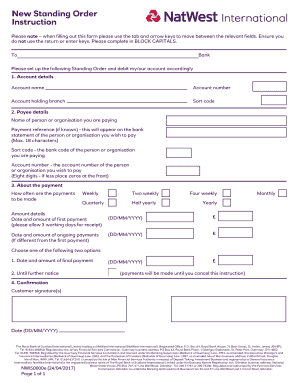
The Standing Order Application for Overseas Remittances is a financial document used by individuals or businesses in Singapore to establish regular overseas payments.
pdfFiller scores top ratings on review platforms




Who needs POSB REM-01?
Explore how professionals across industries use pdfFiller.

POSB REM-01 is needed by:
-
Individuals wanting to regularly send money abroad
-
Businesses making payments to foreign suppliers
-
Freelancers with international clients
-
Expatriates supporting families overseas
-
Students studying abroad who need to transfer funds
-
Financial advisors assisting clients with remittances
Comprehensive Guide to POSB REM-01
What is the Standing Order Application for Overseas Remittances?
The Standing Order Application for Overseas Remittances is a crucial form for individuals and businesses in Singapore aiming to make regular payments to overseas beneficiaries. This application simplifies the process of sending money abroad, ensuring that payments are sent consistently and on schedule.
Regular payments through this form are essential for various reasons, such as paying for services, settling invoices, or supporting family members overseas. Completing the standing order application involves providing necessary information like the applicant's name, contact details, payment frequency, currency, and beneficiary information.
Users must ensure they understand and agree to the terms and conditions included in the application to facilitate successful remittances.
Why Use the Standing Order Application for Overseas Remittances?
Utilizing the Standing Order Application for Overseas Remittances offers multiple benefits for managing international transactions. One of the primary advantages is the convenience of automatic payments, which removes the need for manual processing each time.
This method enhances reliability and security, as financial institutions implement robust measures to protect users' transactions. Additionally, setting up a standing order may lead to potential cost benefits, including lower transaction fees due to the regular nature of payments.
Essential Details Needed for the Application
To successfully complete the application, applicants need to provide specific information:
-
Personal details: name and contact information
-
Payment mode and frequency of payments
-
Currency preferences and beneficiary details
-
Agreement to the terms and conditions before submission
Collecting these details beforehand can streamline the application process and help ensure accurate submissions.
Step-by-Step Guide: How to Fill Out the Standing Order Application
Filling out the Standing Order Application electronically requires attention to detail. Follow these field-by-field instructions to complete the application:
-
Start with the applicant's name and contact number
-
Select the payment mode from the available options
-
Indicate the frequency and currency of payments
-
Specify the beneficiary's information accurately
It's essential to review all entries for accuracy before submitting your application to prevent any common errors that might lead to delays.
How to Submit Your Standing Order Application for Overseas Remittances
After completing the application, there are multiple ways to submit it:
-
Online submission via the financial institution’s platform
-
In-person submission at designated branches
Make sure to check where to submit the form and any associated fees. Once submitted, you will receive confirmation, and tracking options are available to monitor the application status.
What Happens After You Submit the Standing Order Application?
Upon submission, applicants can expect a typical processing time that varies based on the institution's procedures. To check the status of your application, follow the specific guidelines provided during submission.
It's also crucial to understand common rejection reasons, which may include incorrect beneficiary details or incomplete forms. If amendments or corrections are necessary, protocols for addressing these changes can ensure smooth processing.
Ensuring Security and Compliance for Your Application
Users can feel confident about their data safety due to the security features implemented by financial institutions. These measures include encryption and compliance with regulations to protect user data effectively.
Understanding the privacy policies and data protection measures in place is essential for ensuring that personal and financial information remains secure throughout the application process.
Utilizing pdfFiller to Complete Your Standing Order Application
pdfFiller provides an efficient platform for completing the standing order application. Users benefit from features that allow them to edit, fill, and sign forms easily without the need for downloads, enhancing accessibility.
The platform also enables users to securely create, store, and manage their forms in the cloud, simplifying the overall experience and ensuring safe document handling throughout the process.
Sample of a Completed Standing Order Application for Overseas Remittances
To assist with your application, refer to a sample of a completed standing order form. This example highlights significant fields to be filled and illustrates common mistakes to avoid, ensuring you are well-prepared when creating your own submission.
Using the sample as a reference can increase the accuracy of your application, making the process smoother and more efficient.
How to fill out the POSB REM-01
-
1.Begin by accessing pdfFiller and logging into your account. Search for 'Standing Order Application for Overseas Remittances' in the document search bar.
-
2.Click on the form to open it in the editing interface. Familiarize yourself with the layout, including blank fields and checkboxes.
-
3.Before filling out the form, gather all necessary information such as your name, contact details, payment mode, frequency, currency, and beneficiary information.
-
4.Start entering your personal information in the designated fields. Fill in your name, contact number, and any other requested details accurately.
-
5.Select your preferred payment mode and frequency by clicking on the corresponding checkboxes or fields. Ensure that you choose the correct currency for your remittance.
-
6.Proceed to fill in the beneficiary's details carefully. Double-check the accuracy of the beneficiary's name and banking information to avoid errors.
-
7.Review the terms and conditions included in the form. Make sure to read them thoroughly to understand your obligations.
-
8.Once all fields are completed, take a moment to review the entire form for any mistakes or missing information.
-
9.After finalizing the form, click on 'Save' to store your progress. You can also choose to download a copy to keep for your records.
-
10.To submit the form, follow pdfFiller’s submission instructions, which may include sending it directly to your bank or printing it out for manual submission.

Who is eligible to fill out the Standing Order Application for Overseas Remittances?
Individuals and businesses residing in Singapore who wish to set up regular overseas payments can fill out the Standing Order Application for Overseas Remittances. Ensure you have the necessary details about the payments and beneficiaries.
What documents do I need to submit with this application?
Typically, you may need to submit identification documents and proof of the beneficiary's banking details along with the completed form. Check with your bank for any specific requirements.
How do I submit the form once completed?
Once you have filled out the Standing Order Application, you can submit it directly through pdfFiller if your bank supports online submissions, or print it out for manual submission.
Are there any fees associated with setting up a standing order?
There may be fees charged by your bank for processing standing orders or remittances. It’s best to check with your bank for any applicable fees before submitting the form.
What common mistakes should I avoid while filling out the form?
Ensure that all details are accurately entered, especially the beneficiary's information. Double-check payment modes and frequencies selected, as incorrect entries can lead to payment delays.
How long does it take for the standing order to be set up and processed?
The processing time for setting up a standing order can vary by bank but usually takes a few business days. Check with your bank for specific timelines.
Can I modify or cancel a standing order once established?
Yes, standing orders can usually be modified or canceled at any time through your bank. Consult your bank for their specific process to make changes to your standing order.
Related Content
Related Forms


Get the latest insights from our blog



If you believe that this page should be taken down, please follow our DMCA take down process
here
.
This form may include fields for payment information. Data entered in these fields is not covered by PCI DSS compliance.